
Patient Intake Form
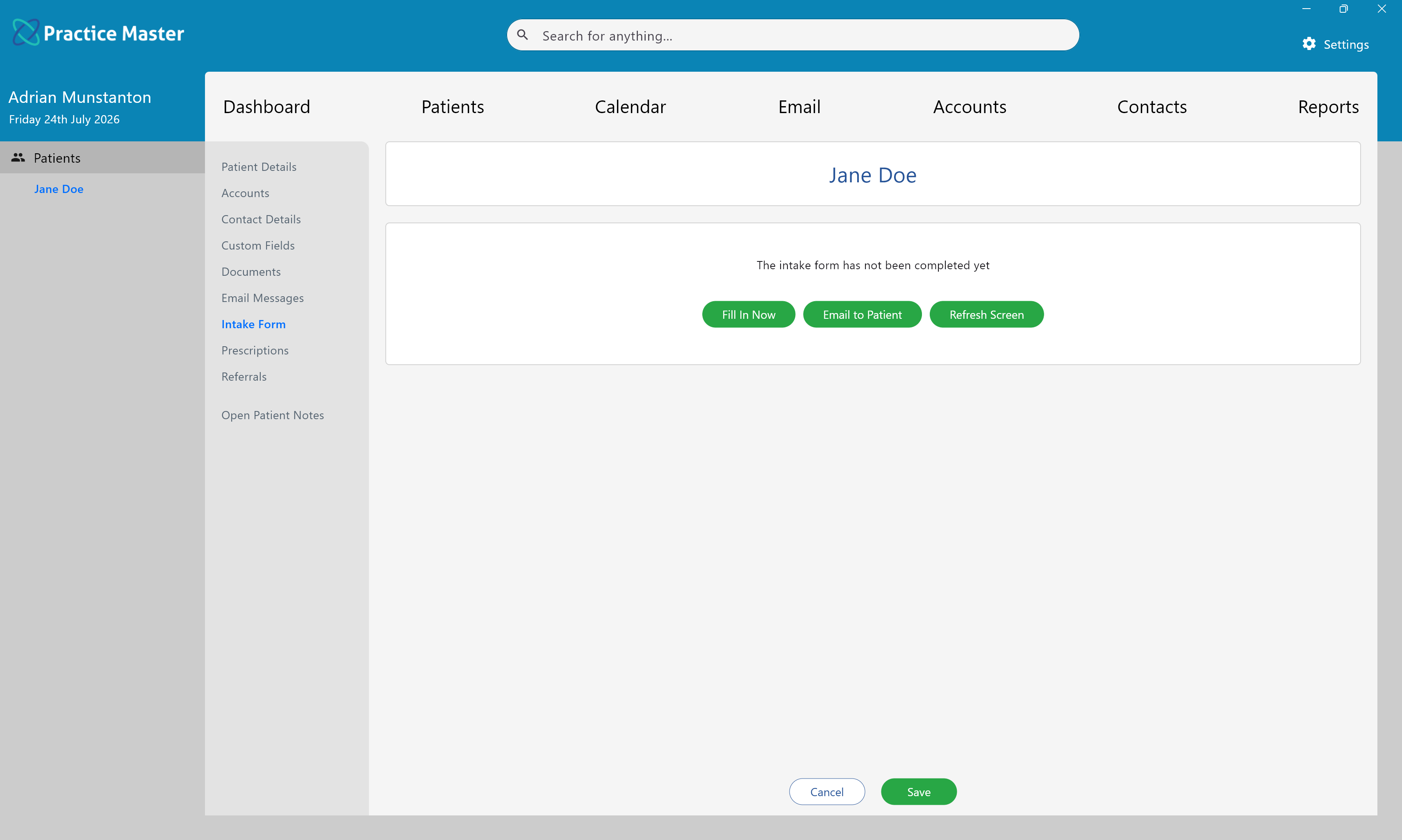
Send, complete and review the patient's online intake form from within the Patient Record.
Key Activities
- Send online intake forms directly to patients.
- Include intake form links automatically in appointment confirmation and reminder emails.
- Patients complete forms securely using a web browser.
- Completed forms automatically appear within the Patient Record.
- Intake form responses can also be displayed within Patient Notes templates.
Overview
The Patient Intake Form allows patients to complete practice-specific forms online before attending their appointment. Forms are designed within the Administration area and may contain sections, questions and answer fields tailored to your practice.
Patients receive a secure web link either by emailing it directly from this screen or automatically as part of an appointment confirmation or reminder email. Once submitted, the completed intake form becomes part of the patient's permanent record.
Common Tasks
The following common tasks can help you get the most out of this screen:
Email an intake form
- Open the patient's Intake Form tab.
- Click Email to Patient.
- An email containing the secure intake form link is sent to the patient.
Complete the form on behalf of a patient
- Click Fill In Now.
- Complete the intake form during the consultation or while speaking with the patient.
- Save the completed form.
Refresh the displayed form
- Click Refresh Screen.
- The latest version of the patient's submitted intake form is loaded.
Screen Reference
A detailed description of various screen elements:
Intake Form Status
Before the patient completes their intake form, this page displays options for delivering or completing the form.
Once submitted, the completed intake form replaces these options and is displayed directly within this page.
Fill In Now
Opens the intake form immediately, allowing practice staff to complete the questionnaire on behalf of the patient.
This is useful when the patient is attending the clinic in person or when completing the form over the telephone.
Email to Patient
Sends the patient a secure web link to their online intake form.
The patient simply clicks the link, completes the form using their web browser and submits their responses back to Practice Master.
Automatic Appointment Emails
Intake form links may also be included automatically within appointment confirmation and reminder emails, allowing patients to complete their paperwork before arriving at the practice.
Completed Intake Forms
Once submitted, the completed intake form is stored as part of the patient's permanent clinical record and is displayed within this page for future reference.
Patient Notes Integration
Intake forms can also be embedded directly within Patient Notes templates.
This allows practitioners to review the patient's responses alongside their consultation notes without switching between different areas of Practice Master.
Administration
Intake forms are designed and maintained within the Administration area. Practices can create their own sections, questions and answer fields to collect the information most relevant to their workflows.
Save
Saves any changes made to the Patient Record.
Cancel
Closes the Patient Record without saving any unsaved changes.